

This page extends the Video secure token guide. If you haven’t set up secure tokens yet, start there first — it covers enabling the feature, the URL format, and token generation. This page picks up where that guide leaves off and shows how to keep tokens short-lived and auto-refreshed so viewers can’t share links.
The link-sharing problem
A secure token embeds authentication directly in the HLS/DASH URL path: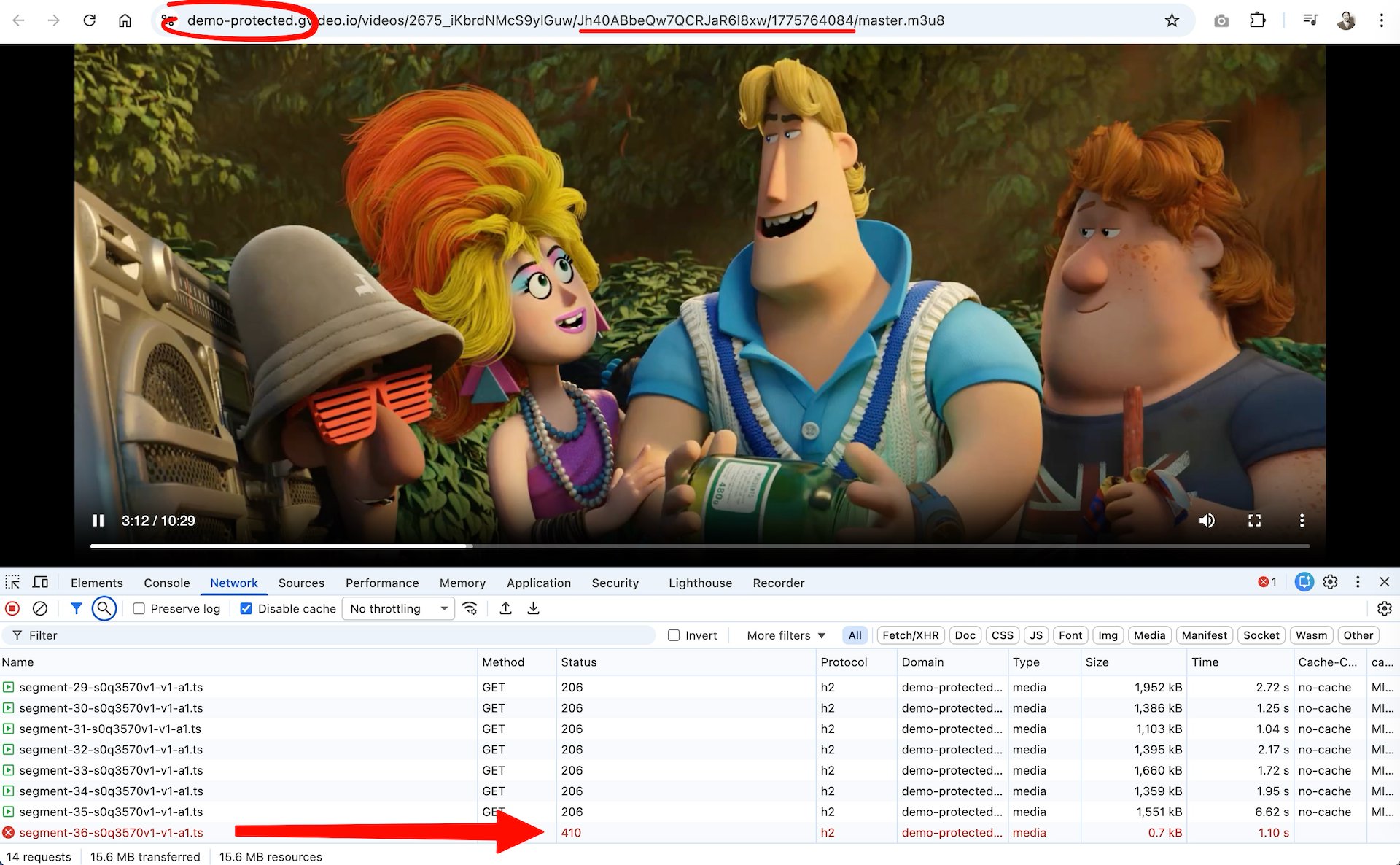
How auto-refresh works
- The player loads with a signed URL containing a short-lived token (e.g., 60 s).
- A timer fires a few seconds before expiry.
- The player calls your backend and receives a fresh
{ token, expires, url }response. - The new
{token}/{expires}path segments replace the old ones in every outgoing request. - Playback continues without a visible interruption. The viewer’s browser still shows a URL that will expire in seconds — sharing it is pointless.
Token modes
There are two types of secure tokens you can use with auto-refresh:
For maximum protection, use short-lived IP-bound tokens — a shared URL is both nearly expired and locked to the original viewer’s IP. But keep in mind the tradeoff: the shorter the token lifetime, the more sensitive the system becomes to poor network conditions (see Choosing a token lifetime below).
Choosing a token lifetime
The demo usesexpire=60 (60 seconds) to make refresh cycles easy to observe. In production, 60 seconds is very aggressive — use it only if link sharing during live events is a critical threat.
The core tradeoff is: shorter TTL = stronger protection, but less tolerance for slow networks.
On a poor mobile connection, a viewer’s player may take several seconds to fetch a fresh token and download the next media segment before the old token expires. If both operations don’t complete within the token’s lifetime, the CDN will reject the segment request with a 403/410 and playback will stall or error.
A rule of thumb: set
refreshLeadSeconds to at least 20-30% of the token lifetime. For a 300-second token, a lead of 60-90 seconds gives enough runway for the token fetch to complete even on a slow connection before the current token expires.Frontend: player-side refresh logic
Token refresh is a client-side responsibility — the CDN validates tokens but has no mechanism to issue new ones on behalf of viewers. Making this seamless requires two things working together:- A backend endpoint that generates fresh signed URLs on demand (your server holds the secret key and verifies that the user is still authorized).
- Player-side refresh logic that calls your endpoint shortly before the current token expires and updates all outgoing URLs transparently — without stopping or reloading the stream.
Backend: generating tokens
Token generation must run on your server — the CDN secret key must never be sent to the browser. Your backend must verify that the requesting user has a valid session and the right to access the specific video before generating a token.What is Gcore FastEdge?
Gcore FastEdge is a serverless edge-compute platform that runs WebAssembly applications at CDN edge locations worldwide. Apps compile to WASM, start in microseconds with no cold starts, and respond in milliseconds. Billing is per request with no idle cost. For token signing — a stateless, CPU-bound computation — FastEdge is a natural fit: it runs close to the viewer, scales automatically to any load, and requires no dedicated infrastructure to manage.Need user authentication? The demo FastEdge app generates tokens for anyone who calls it — there is no login check. If you need to restrict access to authenticated users only (subscribers, paid accounts, ticket holders), you must implement your own backend endpoint that verifies the user’s session or JWT before generating a token. FastEdge can still be used for that, but the authentication logic must be added to the app. Alternatively, use any backend stack you already have (Node.js, Python, Go, etc.) — the token generation formula is the same regardless of the platform.
Demo token API
A working demo endpoint is available for testing and development: GET: https://video-token-102748.fastedge.app/?video=iKbrdNMcS9ylGuw&type=vod&expire=60demo-protected.gvideo.io domain only. Use it for testing and integration purposes — it cannot be used with your own CDN resource or content.
Response:
FastEdge app source code
The demo endpoint is a Rust WebAssembly application deployed on FastEdge. You can use it as a starting point for your own token API.Player integration
The examples below use the demo API. ReplaceTOKEN_API_URL with your own authenticated backend endpoint before deploying to production.
Demo app for Gcore Video Player is available here: https://g-core.github.io/gcore-videoplayer-js/example/protected-content.html
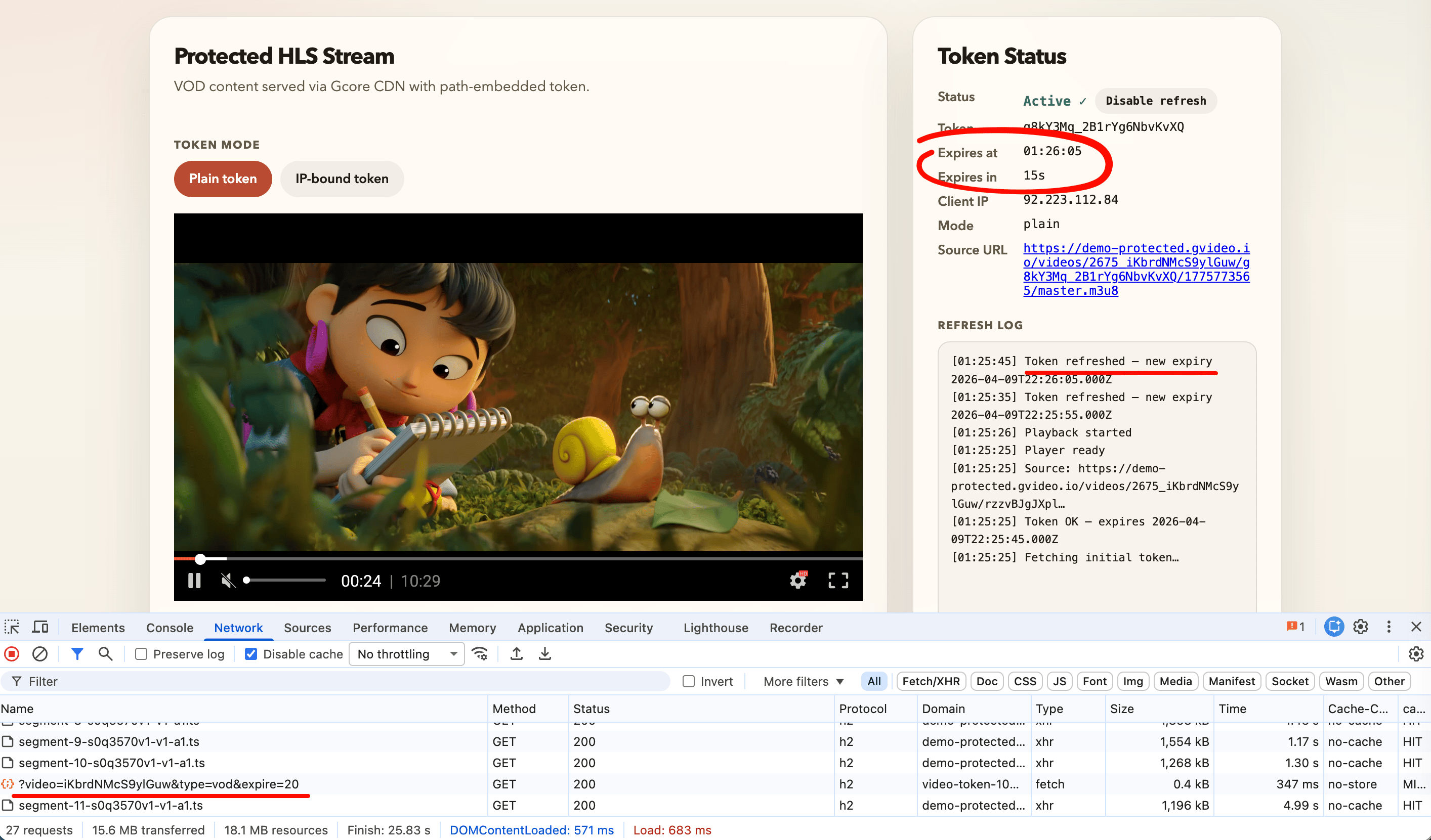
- Gcore Video Player + plugin
TokenRefreshPlugin(recommended) - HLS.js + custom URL loader
- Dash.js + custom URL loader
{token}/{expires} path segments in every outgoing request, and a timer fetches a fresh token a few seconds before expiry. Playback is never interrupted.
Gcore Video Player (recommended)
The Gcore Video Player (@gcorevideo/player) ships a built-in TokenRefreshPlugin that handles token rotation automatically. This is the easiest integration — no custom loaders or request interceptors are needed. Recommended for most use cases and for teams new to protected streaming.
GitHub: github.com/G-Core/gcore-videoplayer-js
How the plugin works:
- Register
TokenRefreshPluginonce before creating anyPlayerinstance. - Pass a
getTokenfunction in thetokenRefreshconfig. The plugin calls it automatically a few seconds before expiry. - The plugin injects a custom hls.js URL-rewriting loader internally. Every outgoing request — manifest, playlist, segment — uses the latest token. The player never stalls or reloads the source.
hls.js
For custom player builds, React/Vue/Angular integrations, or any setup that uses hls.js directly, configure a custom URL-rewriting loader and a refresh timer. How it works:TokenRewriteLoaderextends the default hls.js XHR loader. Before every request — master playlist, sub-playlists, media segments — it callsrewriteUrl()to replace the stale{token}/{expires}with the current values.tokenStateis a plain object shared between the loader and the refresh timer. The loader closure always reads the latest value.- A
setTimeout-based scheduler triggers a refresh ~10 s before expiry and reschedules itself after each successful fetch.
dash.js
For MPEG-DASH streams, dash.js provides aRequestModifier extension that rewrites every URL before the request is dispatched. The refresh timer is identical to the hls.js approach.
How it works:
- The
RequestModifierextension’smodifyRequest()method is called by dash.js before every HTTP request — MPD manifest, segments, initialization chunks. - The same
TOKEN_REregex used in the hls.js example works for DASH URLs too, since Gcore uses the same{token}/{expires}path convention for both HLS and DASH.
The demo token API returns HLS URLs ending in
master.m3u8. For DASH, replace that suffix with index.mpd — the token and expires values are the same.Next steps
- Replace the demo endpoint with your own authenticated backend that verifies user sessions before issuing tokens.
- IP-bound tokens: use
tokenData.url_ipas the source URL andtokenData.token_ipin the state; setipBound: truein the Gcore PlayertokenRefreshconfig. - Tune timing: the demo uses 60 s for visibility, but real-world deployments typically use 300–600 s (5–10 minutes). See Choosing a token lifetime for the full tradeoff table.
- Defense in depth: combine short-lived tokens with geo-blocking and referrer validation on your Custom CDN resource.